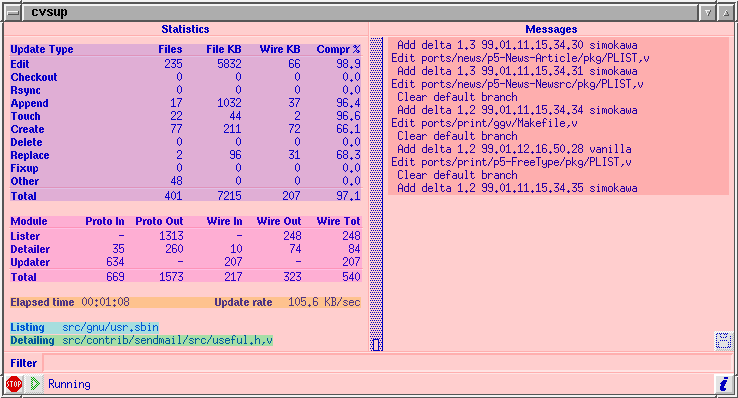
Yes, CVSup has a GUI. It's optional, though. You can easily leave it out when building the software, and even if it's present you can choose whether or not to use it. Some users like GUIs, and others hate them. Either way, they get what they want.
Why a GUI at all? The answer is simple. With three client threads doing three different things all at once, there's a lot going on when you run CVSup. When I was first developing the software, I realized right away that I would need to be able to watch all the parts in action in order to debug it and tune it for best performance. A bunch of text lines printed to a file weren't going to be adequate. So the GUI was originally created as a crutch for the developer. But pretty soon I found that I just loved to watch it run. And, truth be told, after almost three years I still get a thrill every time I see it. The GUI can't really do very much, but it's fun to watch.
The screenshot below is from an update of my local copy of the entire FreeBSD source repository. The repository is 564MB in size, distributed among 48,500 files in 12,900 directories. The CVSup server is 10 hops away on the Internet. My connection to the Internet is a wimpy 56000 bits/second frame relay link, with a maximum theoretical speed of less than 7000 bytes/second. In practice, I usually see speeds between 5K to 6K bytes/second under good conditions.
I added the colored shading to the screenshot for the purpose of exposition; it wasn't present in the original screenshot.
As described elsewhere, the CVSup client has three threads that run simultaneously: the Tree Lister, the File Detailer, and the File Updater. Three areas of the screen display the activities of each of those threads.
| The Tree Lister sends a list of the client's files and their attributes (modification times, etc.) to the server. It is the first stage of the pipeline, so it is always further along than the other two threads. The FreeBSD repository has six top-level directories: CVSROOT, distrib, doc, ports, src, and www. Of these, ports and src are very large, while the others are quite small. CVSup processes the files in alphabetical order at each directory level. In this screenshot, the Tree Lister has finished with ports and is a good way into src already. |
| The File Detailer examines the files that the server has determined are out of date, and decides on the best way to update them. Here, it is working on src/contrib/sendmail/src/useful.h,v. This file had been processed by the Tree Lister some time earlier, and it has just now made its way through the pipeline to the File Detailer. |
| The File Updater edits the client's files to bring them up to date. As the last stage in the pipeline, it lags behind the other threads in processing files. Here, it is still working on the ports subtree even though the other threads have already made it as far as src. In this display you can see how CVSup takes advantage of its knowledge of RCS files. It transfers only the deltas that are missing, and edits them into the client's RCS files. |
| The remainder of the display is devoted to statistics. The top portion breaks down the updates according to the methods used, and shows how effective each method has been so far. For example, the "Edit" line represents updates involving RCS files. So far, 235 files totaling 5832 KBytes in size have been updated. Yet to accomplish that, CVSup has needed to send only 66 KBytes across the network. It has achieved 98.9% compression for RCS file updates. In other words, CVSup was able to avoid sending 98.9% of the bytes. The compression is lower for the "Create" method. Obviously, when sending a file that is entirely new, no editing is possible. The 66.1% compression for Creates comes from using the zlib compression package. |
| The next section of the statistics display breaks down the bandwidth usage by thread. All numbers are in KBytes. Proto In and Proto Out represent the amount of data received and sent by each thread, before the zlib compression has been applied. The "Wire" numbers are the amounts actually sent across the network. Here you can see that CVSup is doing a fairly good job of balancing the two directions of traffic through the network. That means it is fully utilizing the available bandwidth in both directions. |
| The last section of the statistics display shows how long the update has been running, and the effective file update rate. The update rate is the total size of all the updated files divided by the elapsed time. A dumb file update package such as rdist would need a network connection at least this fast in order to keep up with CVSup. In this example, CVSup has managed to update files at a rate 20 times faster than the raw speed of the network connection. And that is by no means the best it can do. See this screenshot for an even more impressive set of numbers. |